An issue has been resolved where mediator events were not correctly delivered from the mediator instance to the Paradym webhook sender, which resulted in mediated didcomm messages not correctly being delivered.
Changelog
See the most recent changes in Paradym.
Resolved an issue where mediator events were not correctly delivered
January 23, 2026
Bug fix
Custom capabilities for certificate signing requests
January 20, 2026
New feature
To better integrate with external certificate authorities Paradym now supports defining the required capabilities when creating a certificate signing request. The certificate signing request will be adjusted based on capabilities, and validated against the requested capabilities when the certificate is imported.
Currently one a single signMdl capability is supported, which can only be used for issuerSignCredential certificates and is enabled by default for this certificate type.
The signMdl capability enables signing ISO 18013-5 mDLs, and ensures the mdlDS extended key usage
is present in the certificate signing request and imported certificate. When this capability is enabled,
the imported certificate must adhere to Document Signer Certificate requirements as defined in ISO 18013-5 Table B.3.
This capability only covers signing mDLs. Without this capability on the certificate, you cannot issue mDLs. ISO 23220-4 is a pending standard that defines generic mDoc signing capabilities, and introduces a new mdocDS extended key usage. In the future an additional capability will be added for this, which will impact non-mDL signing.
Support for Version 1 of OpenID for Verifiable Credentials protocols
January 14, 2026
New featureEnhancementBug fix
Paradym now supports version 1 of the OpenID for Verifiable Credentials suite of specifications.
Existing projects will keep using the existent version (from now on called "legacy"), which is based on draft 21 of the OpenID for Verifiable Presentations specification, and drafts 11 through 14 of the OpenID for Verifiable Credential Issuance specification.
New projects will automatically be configured to use version 1. The OpenID4VC version can be changed on a per project basis in the dashboard under Settings → Profile. Old projects can also be upgraded by updating the configuration.
Upgrading to V1 of OpenID4VC is a one-time operation, and cannot be reverted. If migration is not possible but already want to use V1 you can create a new project. In the future all legacy projects will be migrated to V1.
Some notable changes when updating to V1 of OpenID4VC:
- Response encryption is enabled by default for OpenID4VP. Previously, this was only the case for when requesting mDOCs.
- SD-JWT VCs and associated Token Status Lists signed with X509 certificates do not include an
issfield anymore. - SD-JWT VCs, associated Token Status Lists, and OpenID4VP requests signed with an X509 certificate do not include the root certificate in the
x5cheader anymore to adhere to HAIP requirements. - OpenID4VP requests signed with an X509 certificate now use the
x509_hashclient id prefix instead of thex509_san_dnsto adhere to HAIP requirements.
Bugfixes and improvements
- Fixed an issue for mDoc credentials where
validityInfo.validUntilwas encoded as string instead oftdate.
Certificate Signing Requests for externally signed certificates
January 13, 2026
New featurePro Tier
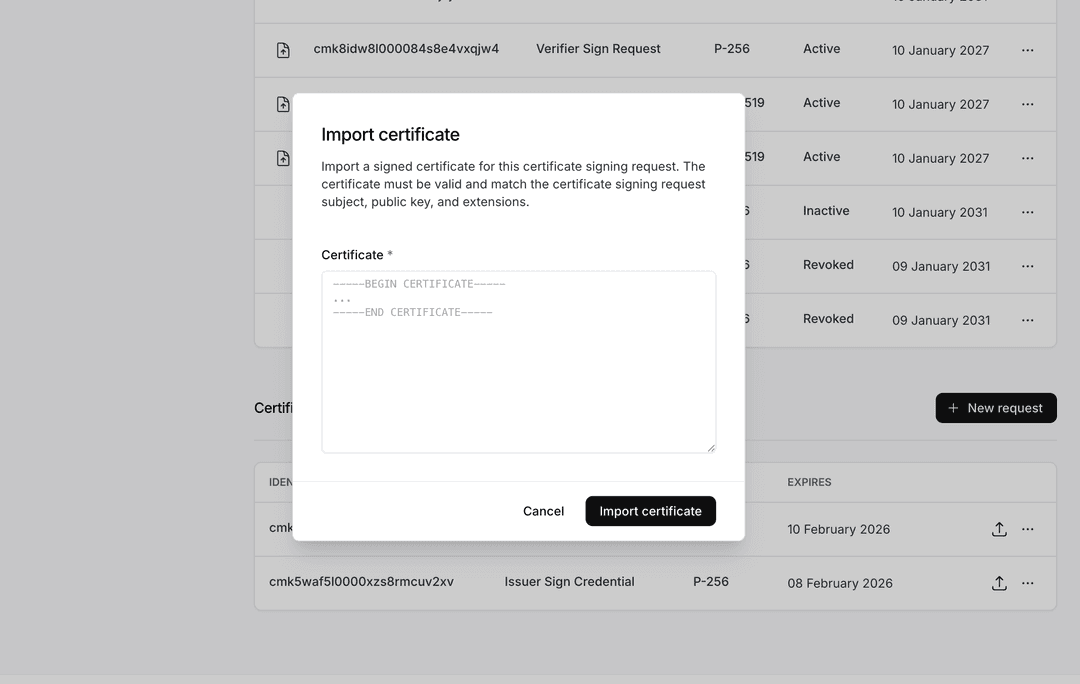
Paradym now supports creating Certificate Signing Requests (CSRs) for externally signed certificates. This allows you to use certificates signed by external certificate authorities instead of only using root certificates created within Paradym.
The certificate signing requests are based on PKCS#10, a common format for requesting an external signature on a certificate.
Certificate signing requests can be created for both issuer (issuerSignCredential) and verifier (verifierSignRequest) leaf certificates through the API or dashboard. Once your CSR is signed by an external certificate authority, you can import the resulting certificate back into Paradym. Certificate signing requests are automatically removed after 30 days if no certificate has been imported.
To start using certificate signing requests, check out the Trust -> My Certificates tab in the Paradym dashboard, Create a certificate signing request through the API, or read more in the Certificates documentation.
Creating externally signed certificates is not available in the Free tier, and only available to the Pro and Custom tiers.
Resolved issue with registration of AnonCreds revocation registries on the cheqd network
January 10, 2026
Bug fix
An issue has been fixed where AnonCreds credential templates with revocation enabled would not properly create new revocation registries and revocation status lists.
Resolved an issue where mDoc credential templates used revoked certificate
January 10, 2026
Bug fix
An issue has been fixed where mDoc credential templates where using revoked or inactive certificates.
All previously created mDoc credential templates have been updated to use an existent, active, issuer root certificate, if existent.
Accepting invitation required to join project
November 29, 2025
Breaking changeEnhancement
Project members must now accept an invitation before they are added to a project. This enhances security, and prevents users from being added to projects without their consent.
When you add a member to a project, either through the API or dashboard, an invitation email will be sent, requesting the user to join the project.
An invitation is valid for 7 days, and a total of three invitations can be sent to an user, after which you must wait for an invitation to expire.
To revoke an invitation before it is accepted, you can make a POST request to https://api.paradym.id/v1/wallets/{walletId}/members/remove. See the API Reference for detailed usage information.
Note: It is still the case that only the owner of the project is able to add and remove members from a project.
Enforce TLS 1.2+
November 28, 2025
Breaking change
To improve the security of Paradym, we now only accept requests from clients using TLS 1.2+. TLS 1.2 is supported by all modern browsers and clients, as well as iOS and Android versions.
If you are experiencing issues, or are not able to upgrade to TLS 1.2+ you can reach out to us.
Configurable verification data retention
November 27, 2025
New featureBreaking change
While Paradym already removed data as soon as possible for most record types, the verification sessions still contained the data from the credentials received in a verification indefinitely.
To better handle different data retention requirements we have added a new configuration option "Verification data access" (verificationDataAccess) to the project settings. The option currently has five options:
webhook- only emit verification data as webhookonce- only allow verification data to be retrieved once, with a limit of 15 minutes.15min- only allow verification data to be retrieved for 15 minutes1week(deprecated, see below) - only allow verification data to be retrieved for 1 weekindefinite(deprecated, see below) - allow verification data to be retrieved indefinitely
For new projects the default is to emit verification data as webhooks (webhook), as we recommend to handle it through webhooks. If you can't rely on webhooks, we recommend setting the access to once (once) or for a maximum of 15 minutes (15min). This should give enough time to fetch the verification data from our API, before it is removed.
For existing projects, we have set the default to indefinite for now (indefinite), to allow for a smoother transition period. You should update your projects to use webhooks (recommended), once (recommend) or 15min.
If the verification data access is set to once, the verification data is only accessible through the "Retrieve verification session by id" endpoints, not through the paginated "Retrieve verification sessions" endpoint.
The 1week and indefinite options are deprecated and only introduced for migration purposes to the newer and shorter retention periods. These options will be removed in the future.
In all cases Paradym will still store the metadata about a verification session in the DIDComm or OpenID4VC verification session. The verification data retention option only covers the actual data from the credentials received in a verification. This includes the following attributes:
presentedAttributesrawissuerholder
You can configure the data retention for your project in the dashboard under Settings → Project. The Verify Credentials guide has been updated with additional context on setting up and handling verification webhook events.
New verification data webhooks
To integrate with the new data access options, we have added two new verification data webhook events:
These two webhook events are similar to their *.verification.verified event counterparts, however this event also contains the data from the credentials received in a verification.
If you're upgrading to handle verification data through webhooks, make sure listen to this event.
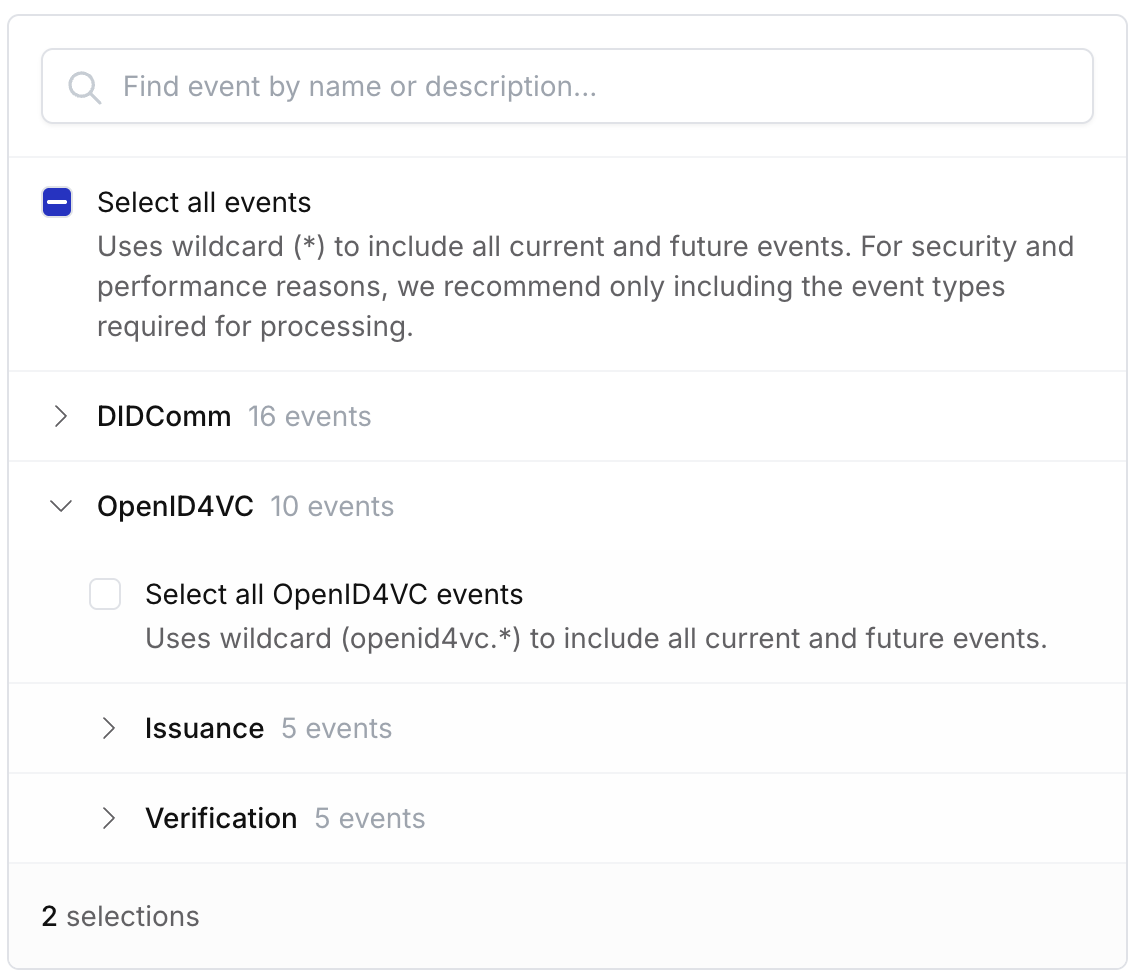
Configure webhook event types from dashboard
while you could already specify which event types to register for a specific webhook through the API, it's now also possible to configure this through the dashboard.
This makes it even easier to only listen for webhooks you need in your application, while also enhancing the performance and security.
You can find the new webhook configuration options in the dashboard under Settings → Webhooks.
Rate limiting and blocked regions
October 20, 2025
New featureBreaking change
To ensure Paradym is secure, stable and always available we have introduced additional network security policies on Paradym's cloud services. If you're using the API normally, you should generally not encounter any issues.
Make sure to read the new Network Security and Rate Limiting article in the documentation.
If you have any questions about the new policies you can reach out to us in the Paradym Slack or by sending an email to contact@animo.id.